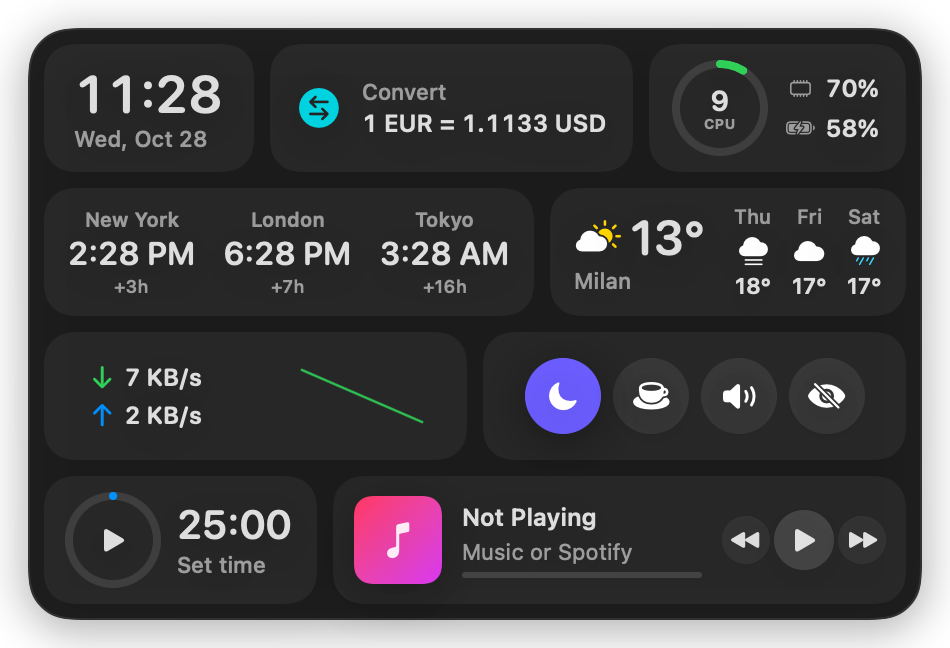
ErDock adds a second, smarter Dock to your Mac: live widgets for your day, your markets, your Mac and your messages. Put it above the Dock, on any edge of the screen, or shape it any way you like.
macOS 14 Sonoma or later · Apple Silicon and Intel · Native, no web views
ErDock sits above your Dock, on every Space, without ever stealing focus from the app you're using.
Seven placements, one bar. On the sides, widgets stay horizontal and pack themselves into rows, so nothing turns sideways and nothing is wasted.
Every widget is live, and most open a fuller panel with a click. Reorder them by dragging in Settings, and save different sets as profiles.
The small things that make ErDock feel like part of macOS.
Questions answered by Apple Intelligence's on-device model. Nothing leaves your Mac, and it costs nothing to use. ⌥⌘I
Start typing a name, pick from your contacts, send an iMessage or an email. Messages and Mail never open. ⌥⌘M
An event across town in an hour, and your iPhone at 40%? ErDock tells you to charge it before you leave.
Five minutes before a call, a notification with a Join button for Zoom, Google Meet, Teams, Webex or FaceTime.
Work, home, trading: each with its own widgets, placement and style. Switch from the menu bar.
Hide it automatically until the mouse touches the edge, or toggle it from anywhere. ⌥⌘L
No account, no tracking, no analytics. Your notes, todos, clipboard and settings live on your Mac. ErDock asks for each permission only when you use the feature that needs it, and keeps API keys in your Keychain.
ErDock only talks to the services your widgets need:
A one-time purchase, no subscription. Your license key arrives by email right after checkout.
Prices include VAT where it applies; checkout, invoices and taxes are handled by Lemon Squeezy. Moving to a new Mac? Deactivate the old one in Settings and activate the new one.
No. It works alongside it. You can keep the Dock as it is, hide it and put ErDock on the bottom edge instead, or use ErDock on a side of the screen.
Any Mac with macOS 14 Sonoma or later, Apple Silicon or Intel. The Ask widget needs macOS 26 with Apple Intelligence turned on.
Only what a widget you turn on needs, and only when you first use it: Calendars and Reminders, Contacts for Quick, Automation for music and messages, Location for battery alerts, and Notifications.
No. The Stocks widget uses your own free Finnhub key, which you can add in Settings if you want stock prices. Everything else works out of the box.
The Personal license covers one Mac and Multi-Mac covers three. You can move a license between Macs at any time from Settings → License.
Yes. Choose which display the bar lives on, or drag it to any screen in the free placements; it resizes to fit each screen.